User Management
Navigation
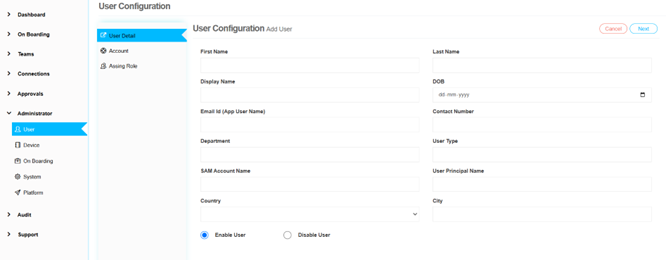
Administrator -> User -> Add
The administrator has the capability to create, update, edit, and delete user accounts within the application. This comprehensive user management functionality is essential for maintaining an organized and secure user base.
Interface Overview
The user management interface is divided into three distinct tabs, each serving a specific purpose:
User Details
This tab allows the administrator to input and manage essential information about each user. Details such as: - User's name - Email address - Contact information - Other relevant personal data
Accurate user details are crucial for effective communication and identification within the application.
Account
In this tab, the administrator can configure account-specific settings for each user. Proper account configuration ensures that users have secure and appropriate access to the application.
← Previous: Platform Configuration | Next: On Boarding Configuration →